
Description
Introduction:
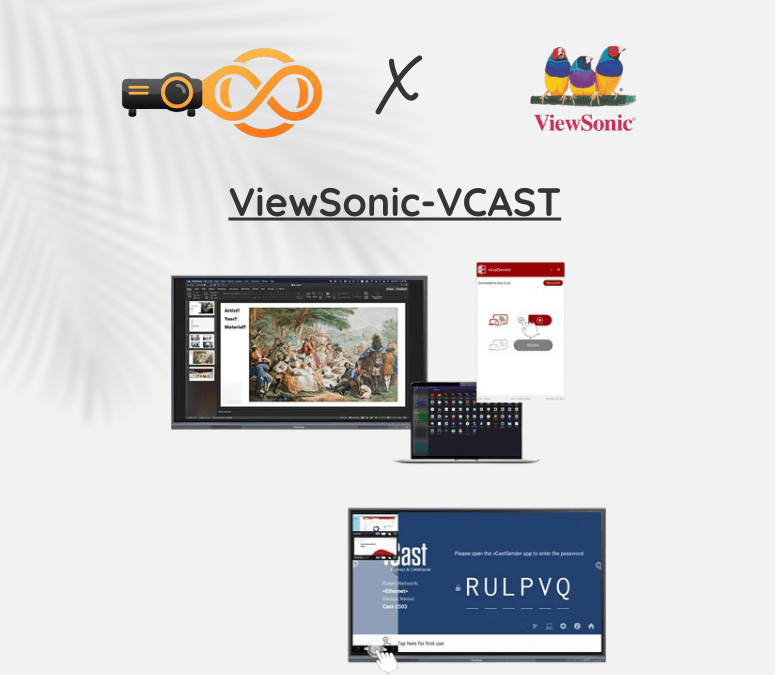
ViewSonic-VCAST is a simple and powerful wireless screen sharing solution designed for modern interactive whiteboard and interactive display setups. If you are searching for an easy way to connect your laptop or mobile to a digital board without HDMI cables, ViewSonic-VCAST makes the process quick and smooth.
It is commonly used with smart board systems and led display panels in classrooms, meeting rooms, and training centers across Pakistan. With just a network connection, users can share presentations, videos, and documents instantly.
How Does ViewSonic-VCAST Work with an Interactive Whiteboard?
Easy Wireless Screen Sharing.
VCAST allows you to mirror your screen directly to an interactive display using Wi-Fi or LAN. There is no need to plug in cables every time someone wants to present.
You simply:
-
Connect both devices to the same network
-
Enter the pairing code
-
Start screen sharing
This makes it perfect for classrooms using an interactive whiteboard where teachers and students need quick access.
Why Use ViewSonic for a Digital Board or Smart Board?
Quick Switching Between Presenters.
In meetings or training sessions, multiple users can connect one by one without unplugging wires. This improves teamwork and saves time.
Works with Multiple Devices.
ViewSonic-VCAST supports:
-
Windows laptops
-
Mac Books
-
Android phones & tablets
-
iPhones & iPads
This flexibility is important for offices and schools using different devices with a smart board or interactive display.
Screen Quality & Performance:
Clear Full HD Display Output.
ViewSonic-VCAST supports up to Full HD resolution, so presentations, videos, and documents appear sharp and clear on large led display screens.
Smooth & Low Delay Performance.
It offers stable wireless streaming with minimal lag. This is helpful when:
-
Playing videos
-
Showing live demos
-
Conducting online classes
-
Sharing detailed graphics
Secure & Professional Sharing Solution:
For offices and institutions, ViewSonic-VCAST includes secure access through on-screen pairing codes. Only authorized users can connect, which protects your meeting content.
It is a professional upgrade from basic screen casting devices because it is built specifically for interactive display and digital board environments.
Where Can You Use ViewSonic-VCAST?
-
Schools using interactive whiteboard
-
Corporate meeting rooms with smart board
-
Training centers with digital board setups
-
Conference halls with led display panels
-
Hybrid classrooms and online meetings
FAQs:
1. How to connect ViewSonic-VCAST to a smart board?
Connect both the smart board and your device to the same Wi-Fi network, enter the pairing code shown on screen, and start sharing.
2. Can I use ViewSonic-VCAST without HDMI cable?
Yes, it works completely wirelessly through Wi-Fi or LAN connection.
3. Does ViewSonic-VCAST support mobile screen sharing?
Yes, you can share your Android or iPhone screen directly to the interactive display.
4. Is ViewSonic-VCAST good for online classes?
Yes, it is ideal for hybrid learning, online lectures, and classroom presentations.
5. What devices are compatible with ViewSonic-VCAST?
It supports Windows, Mac, Android, and iOS devices for easy connection.
Reviews
There are no reviews yet.